


How to Integrate AI in Your WordPress or Joomla Website
You can connect AI-powered tools (chatbots, smart search, or automation) to your website through plugins, extensions, or Application Programming Interface (API) connections. Platforms like WordPress and Joomla easily support these features.
The question is, which features are worth the investment? And how can you get them live without surprise costs or technical headaches?
While basic tools can be self-installed, getting AI integrations right (without slowing your site, creating security gaps, or conflicting with your existing setup) is where most businesses run into trouble.
In this article, we’ll walk you through how to integrate AI in website setups, the high-ROI features to prioritize, and when it makes sense to bring in a development partner.
Key Takeaways:
- AI integration brings features like chatbots, smarter search, and personalization to your site.
- Both WordPress and Joomla handle AI through plugins, embedded scripts, or custom API connections.
- For most sites, a chatbot or AI search is the right place to start – not image recognition, not predictive analytics.
- Simple plugin installs are manageable for most site owners. Once you’re dealing with Joomla, custom themes, or sensitive data, bring in a developer.
- Budget anywhere from a few dollars a month for off-the-shelf tools to $10,000+ for a custom build, and don’t forget ongoing API and subscription costs.
- A bad integration is harder to fix than it was to build. Slow load times, security gaps, broken functionality. The remediation bill usually exceeds what the original build would have cost.
What Is AI Website Integration?
AI website integration, or simply AI integration, is the process of adding artificial intelligence tools directly into a site to automate tasks, analyze user data, and deliver personalized customer experiences.
It’s one of the most common digital upgrades businesses are making nowadays (our clients included!). WordPress and Joomla have both moved in this direction too; AI tools are being folded into their core ecosystems, which means what used to require a custom build can often be handled with a plugin install today.
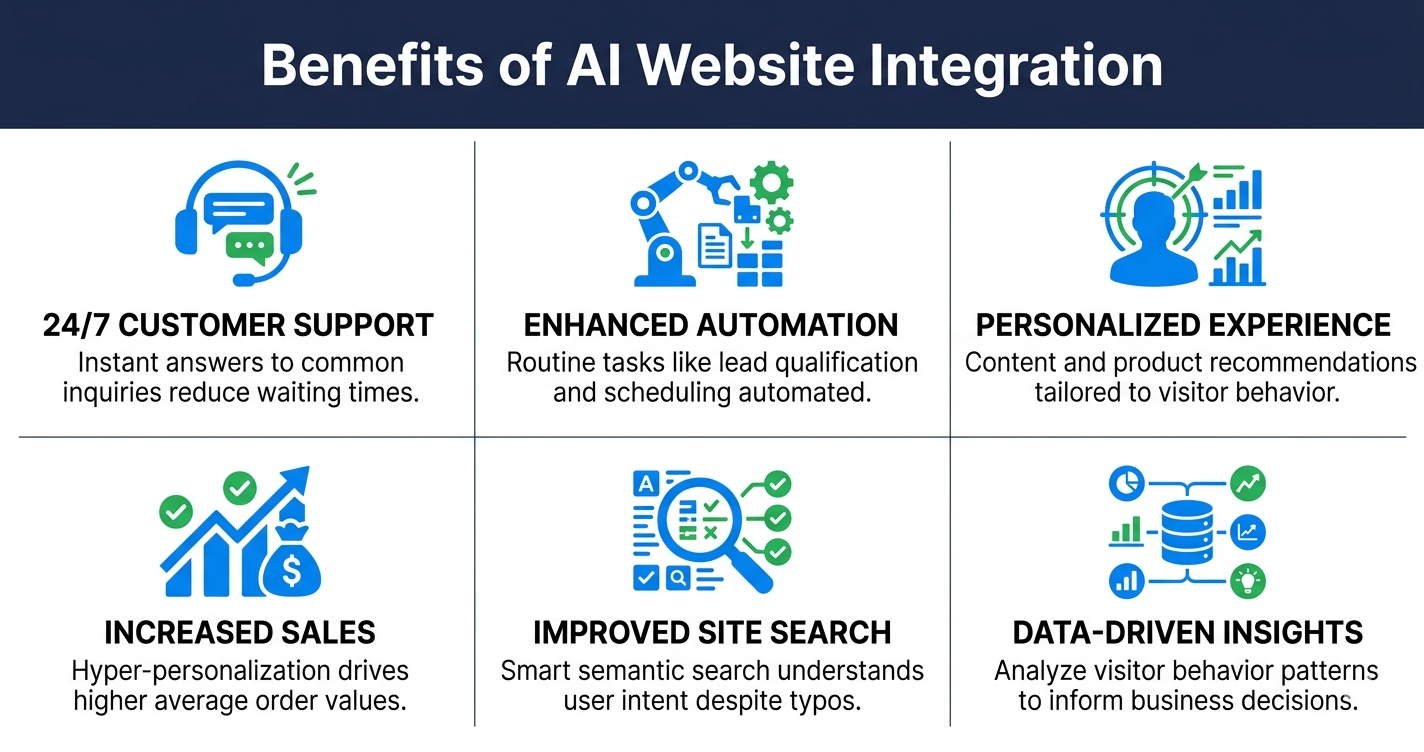
What Are the Benefits of AI Integration on Websites?
AI integration helps with automating customer support, personalizing user experiences, and surfacing data insights that improve conversions. For business owners, it comes down to one thing: your site does more, without you having to do more.
Which AI Features Are Worth Adding to Your Site?
Chatbots, AI-powered search, and personalized recommendations deliver the clearest, most consistent ROI for most businesses. Everything beyond that depends on your site’s size, traffic volume, and what your customers need.
Here is a breakdown of the most practical options:
| AI Feature | What It Does | Best For |
|---|---|---|
| AI Chatbot / Virtual Assistant | Your site’s first responder. It handles incoming questions, qualifies leads, and keeps your site responsive 24/7. | Service businesses, E-commerce, SaaS, agencies |
| AI Site Search | Returns smarter, intent-based results instead of basic keyword matches. | Content-heavy sites, E-commerce, knowledge bases |
| Personalized Recommendations | This tracks behavior and adjusts what gets shown (products, articles, offers) based on what each person is more likely to want. | E-commerce, media, membership sites |
| AI Form Assistant | Guides users through forms in real time. Fewer abandoned fields, better completion rates. | Lead-gen sites, booking platforms, non-profits |
| AI Lead Qualification | Scores leads and routes them to the right sales path. | B2B, agencies, high-ticket services |
| Support Ticket Triage | Categorizes and prioritizes incoming support requests automatically. | SaaS, support-heavy businesses |
| Accessibility Overlay | Adds controls that let visitors adjust how your site looks and behaves, including text size, contrast, and keyboard navigation. | Any public-facing website, non-profit, or government |
| AI Analytics / Insights | Spots trends, churn risks, and conversion issues across your site data. | E-commerce, SaaS, publishers |
| Dynamic Content Personalization | Changes banners, offers, or messaging based on audience segment or behavior. | E-commerce, travel, local services |
How Do You Integrate AI into Your Website?
There are three ways to get AI onto your site: plugins or extensions, third-party script installation, or custom API development. The process varies by platform:
- WordPress has over 3,000+ AI plugins in its directory. A chatbot, smart search tool, or recommendation engine can realistically be live in under ten minutes without disrupting your site. For most setups, there’s no code required. You just install a plugin, connect your API key, and customize settings visually.
- Joomla has a smaller extension library, but provides solid architecture for complex integrations. Basic features work through embedded scripts (copy-paste code), while advanced machine learning integrations require custom components or API-based development (15–30 minutes setup).
Learn more: Free AI Website Builders
Step-by-Step AI Integration Guide
| Step | What to Do | WordPress | Joomla |
|---|---|---|---|
| 1 | Define your use case Pick ONE feature to start (chatbot, search, recommendations, form assistant) |
✅ Start with chatbot or search | ✅ Start with chatbot |
| 2 | Choose your integration method Decide between plugin, embed code, or custom API |
✅ 90% of features available as plugins | ⚠️ Fewer plugins; may need custom component |
| 3 | Get API credentials Sign up for AI service (Chatbase, OpenAI, Zendesk, etc.) and get API key |
✅ Plugin handles API key securely | ⚠️ Store API key in server environment variables |
| 4 | Install the integration Add plugin or paste embed code |
Plugin method:
|
Embed code method:
|
| 5 | Configure settings Customize appearance, behavior, and tone |
✅ Visual editor; no coding needed | ✅ Visual editor in widget/module settings |
| 6 | Test & publish Verify on live site and monitor performance |
✅ Test on staging site first | ✅ Test on staging site first |
Should You DIY Your AI Integration or Hire a Developer?
A single plugin on a standard WordPress site with no custom theme conflicts is manageable for most site owners. It is a practical starting point for testing whether AI features suit your audience before committing to a larger build.
Beyond that, the risk of a misconfigured integration increases significantly. We highly suggest bringing in a developer when:
- Your site has a custom theme, complex plugin stack, or non-standard architecture.
- You’re running Joomla and need anything beyond a basic chatbot embed.
- The integration involves user data, payment flows, or compliance requirements.
- You need the feature to perform reliably under traffic load.
Keep in mind: A poorly configured AI integration can slow your site, introduce security vulnerabilities, and break functionality that was previously stable. The development cost is significantly lower than the cost of recovering from a compromised or broken site.
How Much Does AI Website Integration Cost?
AI website integration costs range from near-zero for basic plugin setups to several thousand dollars for custom API-based builds. The total investment depends on three things: what you’re building, how it’s built, and what it costs to run month to month.
In general, you’ll want to budget for:
- Upfront development cost: A simple plugin install requires minimal development budget. A custom API integration built into your WordPress or Joomla architecture typically runs anywhere from $1,500 to $10,000+ depending on complexity and scope.
- Ongoing subscription fees: Most AI tools (chatbots, search platforms, personalization engines) charge a monthly SaaS fee. Expect anywhere from $30 to $500 per month depending on the tool and your traffic volume.
- Usage-based API costs: If your integration connects directly to an AI provider like OpenAI or Anthropic, you pay per token: meaning costs scale with how often your users or admin uses the feature.
- Maintenance and updates: AI plugins and extensions require regular updates to stay compatible with your CMS and secure against vulnerabilities. Factor in ongoing support costs if you’re not handling this internally.
💡 Tip: Token-based pricing scales faster than most businesses anticipate. Before committing to a custom build, request a usage estimate from your developer based on your current traffic volume.
Ready to Add AI to Your Website?
Most businesses know they need AI on their site. Few know where to start, or how to troubleshoot issues when a plugin conflicts with their existing setup.
At IDL, we handle WordPress and Joomla AI integrations from scoping to launch, giving you frequent updates and full transparency on costs, timeline, and progress throughout. Every project starts with a fixed-price estimate, zero surprise bills, and 60 days of post-launch support to make sure everything runs exactly as it should.
We’ve been building WordPress and Joomla sites for over ten years. And here’s what that experience keeps confirming: even as AI tools get more capable, the difference between an integration that performs and one that quietly breaks your site usually comes down to the person who configured it.
Ready to build a smarter website that grows with your business? Book a free audit today and learn exactly where AI and IDL can make an impact on your site.